Hear every payment.
Never miss a customer.ஒவ்வொரு பண வரவையும் கேளுங்கள்.
எந்த வாடிக்கையாளரையும் தவறவிடாதீர்கள்.
When a UPI payment arrives, Oli says the amount out loud, in your language. No need to look at the screen.UPI பணம் வந்ததும் Oli தொகையை உங்கள் மொழியில் சத்தமாகச் சொல்லும். திரையைப் பார்க்க வேண்டாம்.
Get Oli on WhatsAppWhatsApp-ல் Oli பெறுங்கள்See how it worksஎப்படி என்று பாருங்கள் Oli● Readyதயார்
AUPI+₹1,200
RUPI+₹950
Made for a busy counterபரபரப்பான கடைக்காக
Everything a shop needs, nothing it doesn’t.கடைக்கு தேவையானது எல்லாம், தேவையற்றது எதுவும் இல்லை.
Speaks your languageஉங்கள் மொழியில் பேசும்
Pick up to 3. Oli says the amount in each, one after another.3 வரை தேர்ந்தெடுங்கள். ஒவ்வொன்றிலும் ஒன்றன்பின் ஒன்றாகச் சொல்லும்.
Private, offlineபாதுகாப்பானது, ஆஃப்லைன்
Payment information never leaves the phone.பண தகவல் போனை விட்டு வெளியே போகாது.
Bank SMS backupவங்கி SMS காப்பு
If an app stays quiet, the bank’s credit SMS can still speak.ஆப் அறிவிப்பு வராவிட்டாலும் வங்கி SMS பேசும்.
Loud or in a pocketசத்தமாக அல்லது பாக்கெட்டில்
Loud mode, vibration, Bluetooth speaker.உரத்த முறை, அதிர்வு, ப்ளூடூத் ஸ்பீக்கர்.
Closing totalநாள் முடிவு மொத்தம்
Today’s total, a 7-day chart, share on WhatsApp.இன்றைய மொத்தம், 7 நாள் வரைபடம், WhatsApp-ல் பகிரலாம்.
Your own QR boardஉங்கள் சொந்த QR போர்டு
Make a printable QR board from your UPI ID, on the phone.உங்கள் UPI ஐடியிலிருந்து அச்சிடக்கூடிய QR போர்டை போனிலேயே உருவாக்குங்கள்.
Works with your appsநீங்கள் பயன்படுத்தும் ஆப்களுடன்
Ready in 2 minutes2 நிமிடத்தில் தயார்
Three steps. Nothing else to learn.மூன்று படிகள். வேறு எதுவும் கற்க வேண்டாம்.
Install and allowநிறுவி அனுமதியுங்கள்
Switch on notification access once, so Oli can hear payment alerts.பண அறிவிப்புகளைக் கேட்க ஒருமுறை அறிவிப்பு அணுகலை இயக்குங்கள்.
Customer paysவாடிக்கையாளர் செலுத்துகிறார்
By any UPI app. Oli listens to the alert on your phone.எந்த UPI ஆப்பிலும். உங்கள் போனில் வரும் அறிவிப்பை Oli கேட்கும்.
Oli says itOli சொல்கிறது
“Received 250 rupees”, through the phone or a Bluetooth speaker.“250 ரூபாய் பெறப்பட்டது”, போன் அல்லது ப்ளூடூத் ஸ்பீக்கரில்.
internet permissionஇணைய அனுமதி
SMS permissionSMS அனுமதி
adsவிளம்பரங்கள்
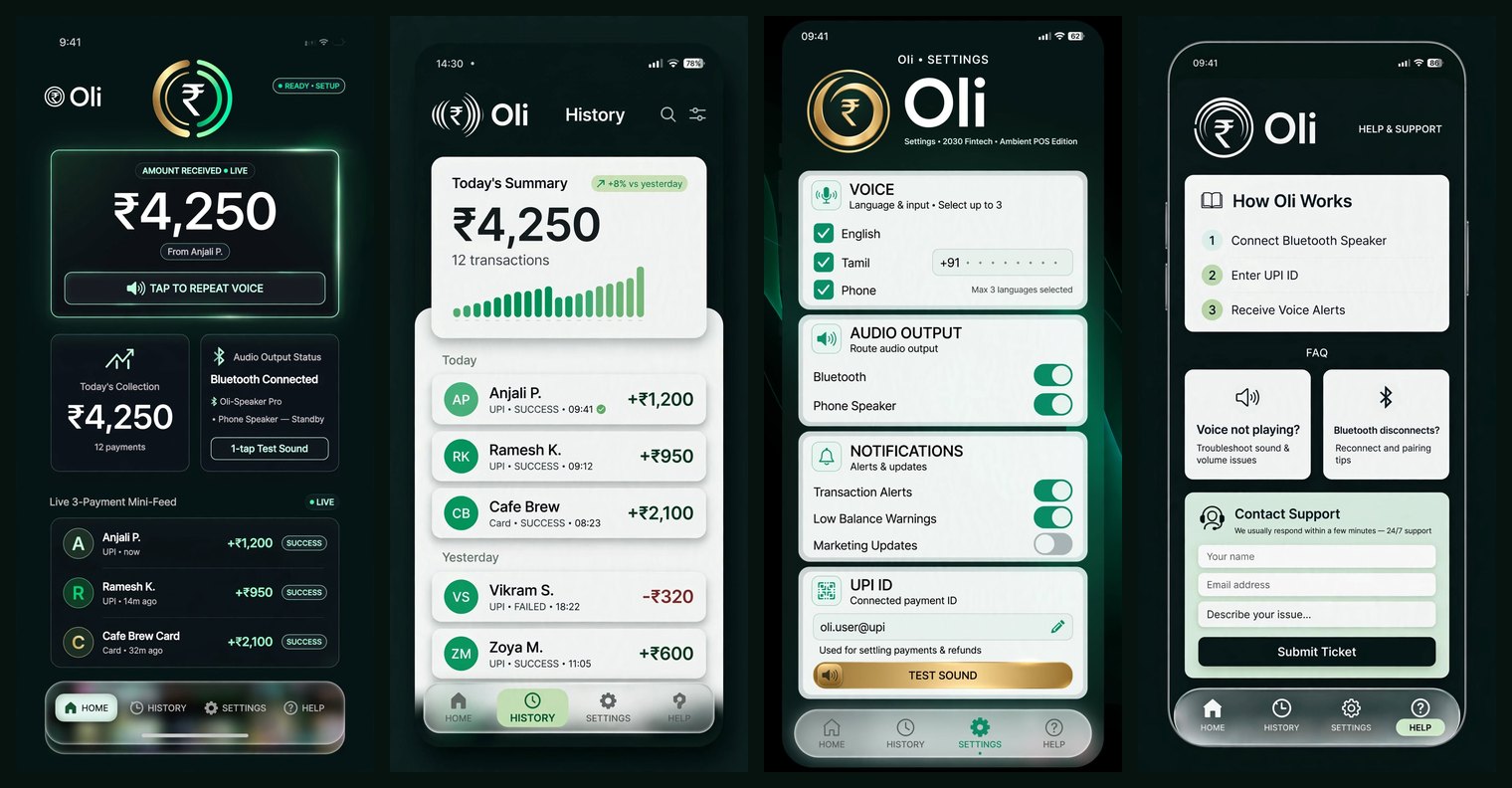
Design preview. The real app follows this layout.வடிவமைப்பு மாதிரி. உண்மையான ஆப் இந்த அமைப்பில் இருக்கும்.
Questionsகேள்விகள்
Do I need internet?இணையம் வேண்டுமா?
Oli does not. It reads alerts already on your phone and speaks with the phone’s own voice. Your payment apps still need internet to receive money.Oli-க்கு வேண்டாம். போனில் வந்த அறிவிப்பைப் படித்து போனின் குரலில் பேசும். பணம் பெற உங்கள் பண ஆப்களுக்கு இணையம் தேவை.
Why notification access?ஏன் அறிவிப்பு அணுகல்?
That is how Oli hears a payment alert. It only announces payments, and you can switch it off any time.பண அறிவிப்பைக் கேட்க இதுதான் வழி. பணத்தை மட்டுமே அறிவிக்கும்; எப்போது வேண்டுமானாலும் அணைக்கலாம்.
Will it work on my phone?என் போனில் வேலை செய்யுமா?
Android 8 or newer. Some brands (Oppo, Xiaomi, Vivo, Samsung) limit background apps, so we help you change one setting on WhatsApp.Android 8 அல்லது புதியது. சில பிராண்டுகள் (Oppo, Xiaomi, Vivo, Samsung) பின்னணி ஆப்களை கட்டுப்படுத்தும்; ஒரு அமைப்பை மாற்ற WhatsApp-ல் உதவுவோம்.
Can someone fake an alert?போலி அறிவிப்பு உருவாக்க முடியுமா?
Oli trusts only known payment apps and bank-style SMS senders. For large amounts, always check your bank balance too.Oli அறியப்பட்ட பண ஆப்களையும் வங்கி போன்ற SMS அனுப்புநர்களையும் மட்டுமே நம்பும். பெரிய தொகைகளுக்கு வங்கி இருப்பையும் பாருங்கள்.
Is it free?இலவசமா?
Oli is free while we test with shops. If that changes, we will tell you first.கடைகளில் சோதிக்கும் வரை Oli இலவசம். மாறினால் முதலில் தெரிவிப்போம்.
Get Oli for your shopஉங்கள் கடைக்கு Oli பெறுங்கள்
Message us on WhatsApp. We send the install file and help you set it up.WhatsApp-ல் செய்தி அனுப்புங்கள். நிறுவல் கோப்பை அனுப்பி அமைக்க உதவுவோம்.
Message us on WhatsAppWhatsApp-ல் செய்தி அனுப்பு